
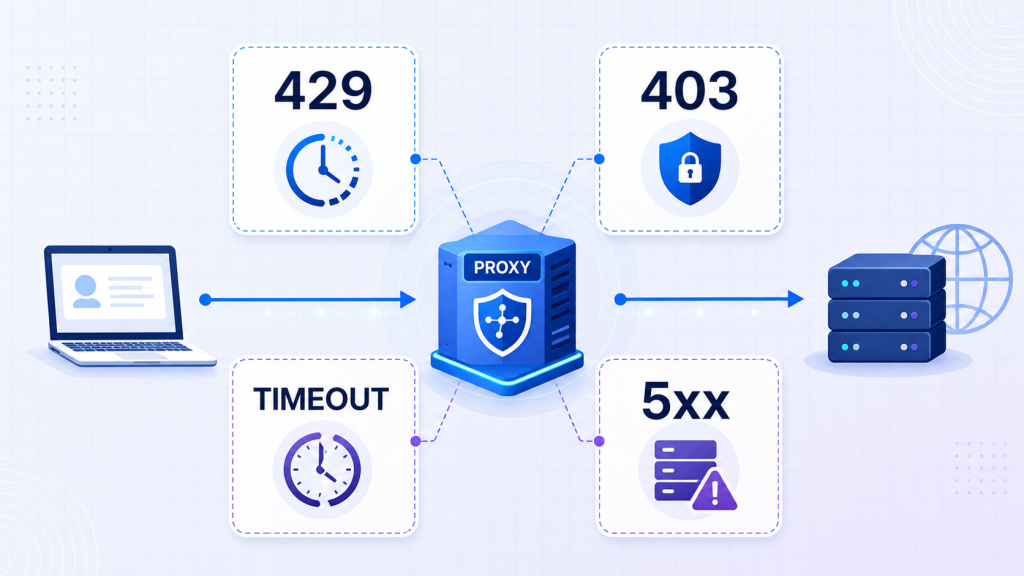
When a proxy request fails, many people’s first reaction is, “This IP is no longer usable,” followed by immediately switching the exit. This may temporarily restore the request, but it can also hide the real problem: request frequency is too high, authentication failed, the target site rejected access, the network route is unstable, or the target server itself is malfunctioning.
To determine the cause of failure, do not merely look at “the request did not succeed.” First confirm where the error occurred. This article starts with common 429, 403, timeout, and 5xx statuses and provides a practical diagnostic sequence.
1. First Identify Where the Error Comes From
A proxy request usually passes through three link segments:
- The client connects to the proxy gateway.
- The proxy gateway connects to the target website.
- The target website returns a response, which the proxy forwards back to the client.
Therefore, the same “failure” may come from the proxy account, proxy node, network route, or target website. Before troubleshooting, record at least the following information:
- Request time and target domain
- Proxy type, region, and session parameters used
- HTTP status code and response headers
- Connection time, time to first byte, and total duration
- Whether the same request works when accessed directly
- Whether the proxy connection works when using another target URL
If you only save “request failed,” it will be almost impossible to reproduce the issue later.
2. 429: Usually a Rate or Quota Problem
429 Too Many Requests means the server believes there are too many current requests. It may be returned by the target website or by the proxy service’s gateway or API.
First check whether the response headers contain:
Retry-After
X-RateLimit-Limit
X-RateLimit-Remaining
X-RateLimit-Reset
If Retry-After is present, wait for the specified time. If there is no explicit wait time, use exponential backoff, such as waiting 2 seconds, 4 seconds, and 8 seconds, while setting a maximum retry limit.
Common causes of 429 include:
- Excessive concurrent requests
- Too many requests within a time unit
- Exhausted API package quota
- Multiple tasks sharing the same account or session
- Overly concentrated request rhythm
The correct response is usually to reduce concurrency, increase request intervals, check account quotas, and follow the target service’s access rules. Frequently changing IPs to bypass website restrictions does not solve task scheduling problems and may lead to more verification challenges or blocks.
3. 403: Distinguish Proxy Authentication From Target Rejection
403 Forbidden means the request reached a server, but the server refused to provide the resource. When handling 403, first confirm whether the response came from the proxy service or the target website.
Pay special attention to the difference between:
407 Proxy Authentication Required: a problem with proxy username, password, or whitelist authentication403 Forbidden: the target website, gateway policy, or permission rule rejected the request
Common causes of 403 include:
- The target content requires login or special permissions
- The request region is outside the content’s allowed range
- Missing cookies, session data, or required request headers
- The URL itself is not accessible to the account
- Website security rules reject the current request pattern
- Access behavior violates the target site’s rules
During troubleshooting, compare a normal browser request with the program request within the scope of authorized testing. Also check account permissions, target URL, cookie validity, and session continuity. If both direct access and proxy access return 403, the problem is usually not the proxy IP itself.
4. Timeout: Distinguish Connection Timeout From Read Timeout
“Timeout” is not a single error. At minimum, distinguish the following stages.
1. Proxy connection timeout
The client cannot connect to the proxy gateway within the specified time. Possible causes include an incorrect proxy host or port, local network restrictions, an unreachable node, or firewall interception.
2. TLS handshake timeout
The TCP connection is established, but the HTTPS handshake does not complete. This may relate to network quality, protocol compatibility, or certificate chain issues.
3. Time-to-first-byte timeout
The request has been sent, but the target server is slow to begin returning content. Target server load, dynamic page generation, or upstream routes may be responsible.
4. Read timeout
The response has started, but no further data arrives for a long time. Large files, slow pages, and unstable routes can all trigger read timeouts.
Do not classify every timeout as “IP failure.” A more reliable method is to configure separate connection timeout and total request timeout values, then record the stage where the failure occurred.
For example, in an authorized test environment:
curl -v --connect-timeout 10 --max-time 30 \
  --proxy "http://username:password@proxy-host:port" \
  "https://example.com/"
Use placeholder credentials during testing, and avoid putting real proxy passwords in screenshots, logs, or public articles.
5. 5xx: Not Necessarily a Proxy Problem
5xx means the server side failed to complete the request normally, but different statuses have different meanings:
| Status Code | Common Meaning | Check First |
|---|---|---|
| 500 | Internal server error | Target website or API application |
| 502 | Gateway received an invalid upstream response | Proxy gateway, CDN, or target upstream |
| 503 | Service temporarily unavailable | Maintenance, overload, or rate limiting |
| 504 | Gateway timed out waiting for upstream | Target response speed and route quality |
You can narrow down the cause with three comparisons:
- Use the same proxy to access another known-normal target.
- Access the same target without a proxy.
- Request again through the same proxy at lower concurrency.
If multiple proxies return the same 5xx for the same target, the problem is more likely with the target website. If the same proxy fails across multiple targets, further inspect the proxy gateway, account status, and node health.
6. Quick Diagnostic Table
| Symptom | More Likely Cause | First Action |
429 with Retry-After | Request rate or quota restriction | Wait according to response header and reduce concurrency |
| 407 | Proxy authentication failure | Check username, password, and IP whitelist |
| 403, and direct access also fails | Permission or target rule issue | Check login state and access permissions |
| Connection timeout for all targets | Proxy endpoint or local network issue | Check host, port, and connectivity |
| Timeout for only one target | Target server or specific route issue | Compare with direct access and other targets |
| Multiple proxies return 500/503 | Target service issue | Wait for recovery and check service status |
| 502/504 from only one gateway | Gateway or upstream route issue | Switch to a compliant gateway and submit logs |
7. Recommended Troubleshooting Order
When a request fails, follow this sequence:
- Save the status code, response headers, and timing data.
- Determine whether the response came from the proxy or the target website.
- Check proxy authentication, account balance, and package quota.
- Access a known-normal test target with the same parameters.
- Compare direct access results where allowed.
- Reduce concurrency and retry a limited number of times.
- Switch exits only after confirming node or route failure.
- Submit the time, node, target domain, and error logs to your provider.
Changing IPs is reasonable only when evidence points to an unavailable node, region mismatch, or route failure. If the root cause is 429, account authentication, request logic, or target service failure, switching IPs often only delays the same problem.
Conclusion
A failed proxy request does not necessarily mean the IP is invalid. 429 usually points to frequency and quota issues. 403 requires checking permissions and access rules. Timeouts must be located to a specific stage. 5xx requires determining whether the failure comes from the target server, proxy gateway, or the route between them.
Building unified log fields, timeout settings, and comparison-test methods makes it easier to identify the root cause than blindly switching IPs. It also reduces ineffective retries and unnecessary traffic costs. All testing should be conducted under authorization and in compliance with the target website’s terms, robots rules, and applicable laws.