
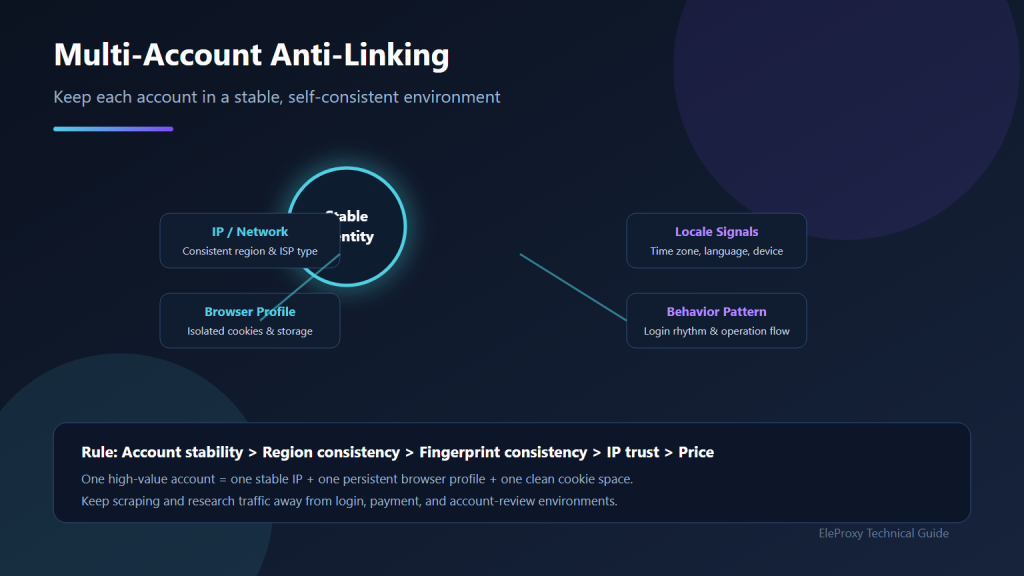
Meta Description: Learn how platforms link multi-account users and how to combine stable IPs, isolated browser profiles, and consistent sessions to reduce risk.
Multi-account operations rarely fail because there are not enough accounts. They fail because platforms decide that several accounts belong to the same person or the same group of environments. Once that happens, the result is often a batch review, restriction, or suspension.
Many people assume that changing an IP address is enough. In reality, platforms combine many signals: IP address, browser fingerprint, cookies, payment details, login times, and behavioral patterns. The IP is only one part of the picture.
As shown above, anti-linking does not start with owning as many IPs as possible. It starts with giving every account a stable and internally consistent environment. The IP exit, browser environment, locale signals, and behavior pattern must all make sense together. A long-term mismatch in any one of them can push an account into a risk review.
This guide explains how account linking works, how static ISP, rotating residential, and mobile 4G proxies support different parts of the workflow, and how to build a practical testing process.
1. How Platforms Identify Linked Accounts
Platforms do not rely on one isolated signal. They combine multiple weak and strong signals into a risk profile.
| Signal | What Platforms Notice |
|---|---|
| IP and network range | Multiple accounts repeatedly using the same exit IP or subnet |
| Browser fingerprint | Nearly identical user agent, Canvas, WebGL, fonts, or screen settings |
| Cookies and local storage | Shared login state or tracking identifiers in the same browser |
| Time zone and language | Locale signals that do not match the IP location |
| Payment data | The same card, wallet, bank account, or payout method |
| Behavior | Highly similar login times, operation rhythm, and device usage |
One matching signal does not automatically link accounts. Several overlapping signals can. Therefore, the goal is not merely to “hide” an IP address. It is to keep every account both isolated from other accounts and consistent within its own environment.
2. Why Shared Datacenter IPs Increase Risk
Shared and datacenter IPs often create more problems than they solve:
- Clear datacenter characteristics: The IP range belongs to a hosting ASN, making it easy to identify as non-consumer infrastructure.
- Poor history: Cheap shared IPs may have already been used by many other people for registrations, automation, or abusive traffic.
- Location drift: The same account appears in one country today and another tomorrow.
- One IP for many accounts: Dozens of accounts sharing one fixed exit is one of the most obvious linking signals.
For valuable accounts, shared datacenter IPs are not a suitable login environment.
3. How the Three Proxy Types Work Together
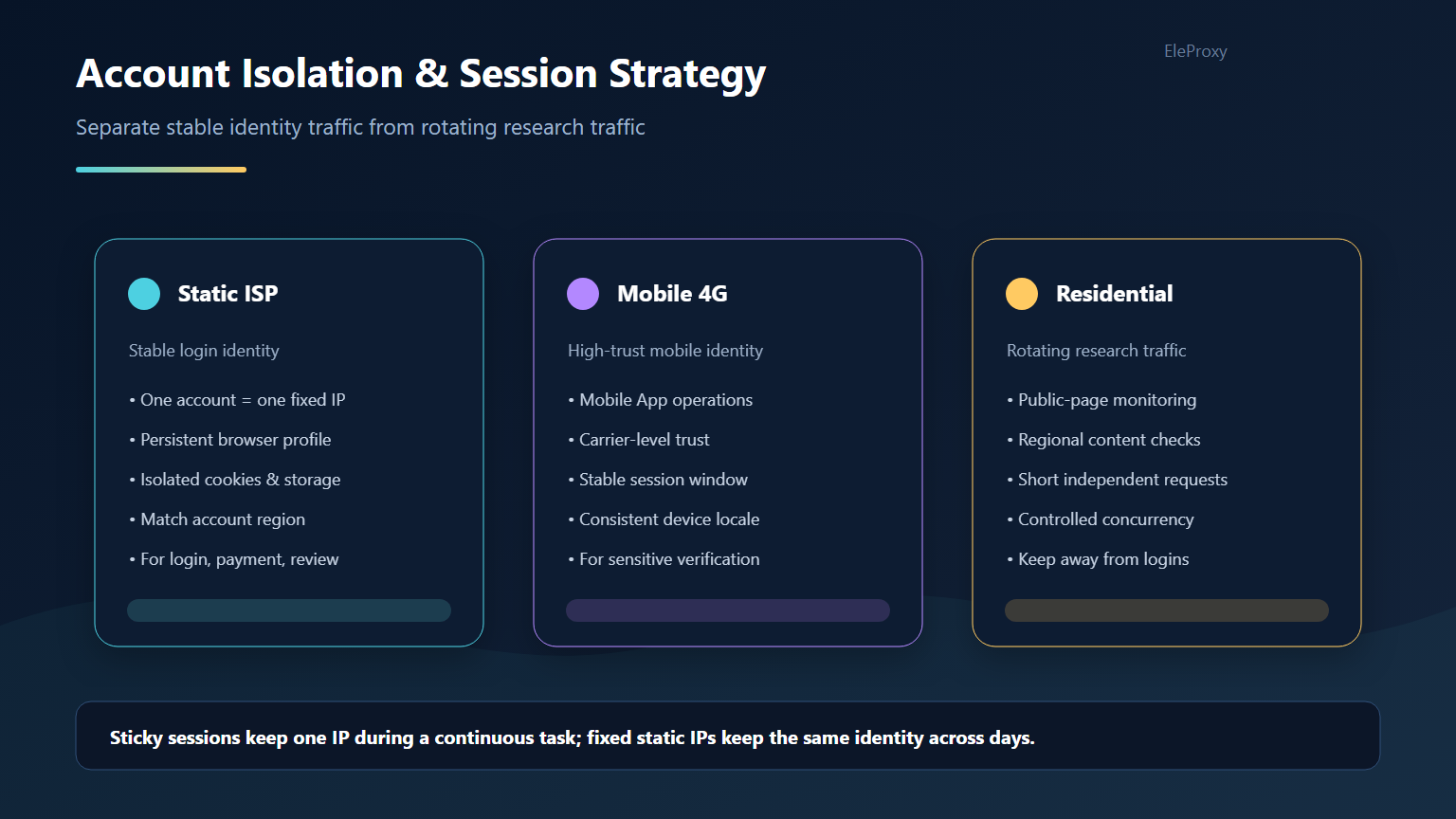
The safest approach is to separate account environments from research traffic. Treat each valuable account as an independent identity with its own exit IP, browser profile, and cookie storage. Keep research and data-collection requests on rotating residential proxies so high-frequency traffic does not pollute the login environment.
Static ISP Proxies: The Stable Address
Static ISP proxies provide a fixed exit with a real ISP network attribute. They are best suited for stable account environments.
Use them for:
- Routine account logins
- Payment and payout workflows
- Long-term stores, ad accounts, and social accounts
What to evaluate:
- IP retention period: How long can the IP remain unchanged, and does it survive renewal?
- Location accuracy: The IP location should match the account profile and payment region.
- Account isolation: Valuable accounts should not permanently share one IP.
- Availability: Login environments need stable uptime, not occasional spikes in performance.
Related product: Static ISP proxies
Rotating Residential Proxies: Research Traffic
Rotating residential proxies distribute requests across a large pool of residential network exits. They are useful for public research, not for maintaining one long-term account identity.
Use them for:
- Competitor and creative research
- Region-based display checks
- Public content collection
Avoid using them for long-lived logins, payment approvals, account reviews, or other session-heavy workflows.
Related product: Rotating residential proxies
Mobile 4G Proxies: Higher-Trust Mobile Environments
Mobile 4G proxies use real carrier network exits. Because many genuine users share similar network ranges, platforms often treat these environments with higher trust.
They can be useful for mobile logins, in-app verification, and social accounts that require a stronger mobile presence.
Mobile IPs are not a substitute for order. If fingerprints, cookies, payment data, and behavior are inconsistent, a mobile IP alone will not prevent linking.
Related product: Mobile 4G proxies
4. Session Persistence and One Account Per Environment
The core rule is simple: one stable account should map to one stable exit and one stable browser environment.
At minimum:
- Do not frequently change the account’s country.
- Perform logins, payments, and reviews from the same stable environment.
- Do not let multiple high-value accounts share one IP for long periods.
- Separate collection traffic from account-login traffic.
Sticky sessions keep the same exit IP for a continuous task, preventing the IP from jumping in the middle of a workflow. With a small number of accounts, each account can use one static ISP IP. At larger scale, group accounts by business unit and avoid putting dozens of accounts behind a single exit.
5. Keep IP and Browser Fingerprints Aligned
A clean IP cannot compensate for a contradictory fingerprint.
| Dimension | Requirement |
|---|---|
| Time zone | Match the IP location |
| Language and region | Match the target market and account profile |
| User agent and device | Stable for each account, with meaningful differences between accounts |
| Cookies and cache | Isolated between accounts |
| Canvas and WebGL | Avoid values that are identical across all accounts or completely blank |
In practice, multi-account teams usually assign one browser profile to each account. The IP, fingerprint, cookies, locale, and account history must operate as one coherent identity.
6. How to Run a Small-Scale Test
IP fraud scores are only a reference. They do not prove that an account environment is safe. A more reliable method is to test with real accounts over time.
- Select three to five real accounts.
- Keep the same device and browser configuration logic for consistency.
- Keep account environments isolated from one another.
- Assign different proxy types according to the workflow.
- Observe the accounts for one to two weeks.
- Record the following metrics.
| Metric | What to Track |
|---|---|
| Login success rate | Frequent secondary verification or CAPTCHA challenges |
| Session stability | Unexpected logouts |
| IP quality | Fraud score, abuse flags, or blacklist status |
| Location accuracy | Exit country, region, and carrier |
| Account health | Restrictions, reviews, or suspension |
7. Common Mistakes
- Choosing only by price: Unstable cheap IPs cause login failures, verification loops, and payment interruptions.
- Putting every account on one IP: Short-term convenience, long-term linking risk.
- Changing countries frequently: Account details, payment region, and login location no longer match.
- Mixing collection and login traffic: High-frequency research requests pollute the account environment.
- Ignoring fingerprints: The IP is only one layer; cookies, device signals, and behavior also matter.
8. Conclusion
For multi-account anti-linking, prioritize in this order:
Environment stability > Location consistency > Fingerprint consistency > IP trust > Price
A practical setup looks like this:
- Account login and payment workflows: static ISP proxies
- Research and public data collection: rotating residential proxies
- Mobile workflows and high-trust social accounts: mobile 4G proxies
No single proxy type solves everything. A robust account environment comes from the combined consistency of IP, browser fingerprint, cookies, payment information, and operating behavior. Start with a small group of accounts, verify stability, then expand gradually.