
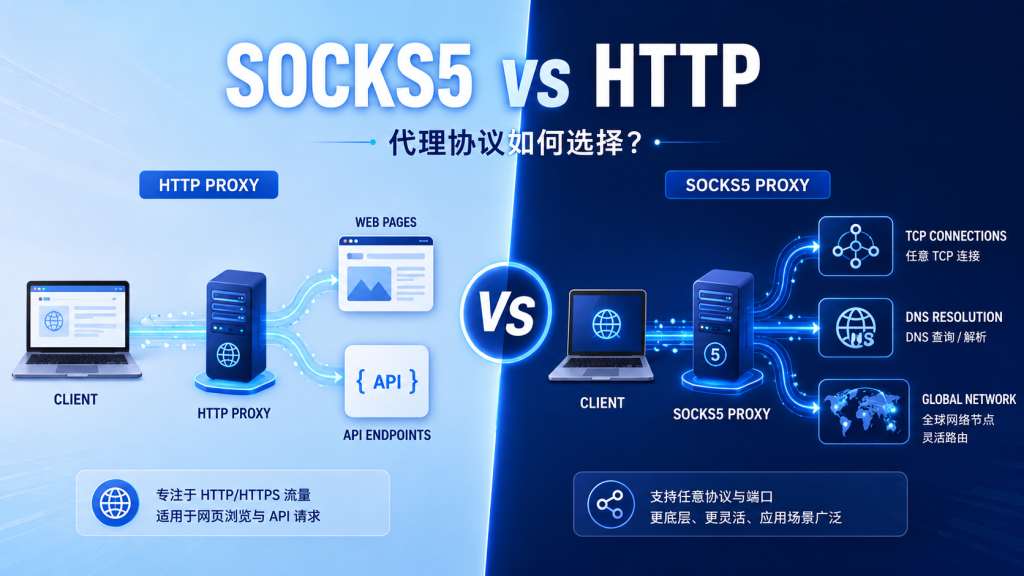
When choosing proxy services, you will often see connection protocols such as HTTP, HTTPS, and SOCKS5. They can all forward network requests, but they differ significantly in working layer, supported scope, configuration, and suitable use cases.
This article compares them from the perspectives of protocol principles, compatibility, performance, security, and practical scenarios to help you choose the more appropriate proxy protocol.
When using proxy services, you should comply with the target website’s terms of service, access frequency limits, privacy policies, and local laws and regulations.
1. What Is an HTTP Proxy?
An HTTP proxy is mainly used to forward HTTP and HTTPS requests. The client first sends the request to the proxy server, which then accesses the target website and returns the response.
The basic flow is as follows:
Client
  ↓ HTTP/HTTPS request
HTTP proxy server
  ↓
Target website
When accessing a standard HTTP website, the proxy server can read and forward the complete HTTP request.
When accessing an HTTPS website, the client usually establishes a tunnel through the HTTP CONNECT method and then performs TLS-encrypted communication with the target website through that tunnel.
Important notes:
- HTTP proxy does not mean plaintext transmission.
- When accessing an HTTPS website, whether the content is encrypted mainly depends on HTTPS/TLS.
- The proxy protocol itself cannot replace the target website’s HTTPS encryption.
2. What Is a SOCKS5 Proxy?
SOCKS5 is a general-purpose network proxy protocol. Unlike HTTP proxies, which mainly handle web requests, SOCKS5 can forward multiple types of TCP-based network connections, and some services also support UDP.
The basic flow is as follows:
Client
  ↓ TCP or UDP connection
SOCKS5 proxy server
  ↓
Target server
SOCKS5 does not need to understand the specific application-layer content. It only establishes the connection and forwards data, so its applicable scope is broader.
Common characteristics include:
- Supports TCP connections
- Protocol design includes UDP forwarding
- Supports username and password authentication
- Can forward network protocols other than HTTP
- Works with browsers, command-line tools, and SOCKS-compatible applications
Whether UDP is actually supported depends on the proxy provider’s and client software’s implementation.
3. Core Differences Between SOCKS5 and HTTP Proxies
| Comparison Item | HTTP Proxy | SOCKS5 Proxy |
|---|---|---|
| Working method | Understands and forwards HTTP requests | General-purpose connection forwarding |
| Web support | Supports HTTP and HTTPS websites | Supports HTTP and HTTPS through TCP forwarding |
| Other TCP protocols | Limited support | Usually supported |
| UDP | Not supported | Protocol-level support, depending on server implementation |
| DNS resolution | Depends on client and implementation | Can be resolved through the proxy side |
| Client compatibility | Broad support in browsers and HTTP tools | Requires client-side SOCKS support |
| Request header handling | Proxy may process HTTP headers | Usually does not parse application-layer content |
| Configuration difficulty | Relatively simple | Slightly more complex |
| Typical use cases | Web access, API requests, public data collection | General network connections, development testing |
4. Which Scenarios Are Suitable for HTTP Proxies?
1. Web and API Requests
If your tasks mainly access web pages and APIs through HTTP or HTTPS, an HTTP proxy is usually sufficient.
For example:
- Public web data collection
- REST API connectivity testing
- Checking page displays in different regions
- Search result and product information research
- Website availability testing
2. Python Requests Projects
Python’s Requests library natively supports HTTP proxies, and configuration is simple:
import requests

proxy_url = "http://username:[email protected]:10000"

proxies = {
    "http": proxy_url,
    "https": proxy_url,
}

response = requests.get(
    "https://httpbin.org/ip",
    proxies=proxies,
    timeout=20,
)

print(response.json())
Here:
"https": proxy_urlmeans HTTPS requests are forwarded through the proxy endpoint. It does not mean the proxy address itself must start with https://. Always follow the connection format provided by your proxy provider.
3. Browser Proxy Configuration
Most browsers, automation testing tools, and operating systems can directly configure HTTP proxies, so compatibility is usually better.
If your business only involves web pages, using an HTTP proxy first can reduce configuration complexity.
5. Which Scenarios Are Suitable for SOCKS5 Proxies?
1. Non-HTTP Network Connections
When an application uses more than just the HTTP protocol, SOCKS5 is more flexible.
For example:
- Desktop clients with SOCKS support
- Command-line network tools
- Custom TCP applications
- Authorized connection testing for databases or remote services
- Development environments that need to forward multiple connection types
2. Resolving Domain Names Through the Proxy
Some clients can hand DNS resolution to the SOCKS5 proxy side.
In Python Requests, you can use:
socks5h://The letter h means the hostname is resolved through the proxy side.
Install the dependency:
pip install "requests[socks]"Configuration example:
import requests

proxy_url = (
    "socks5h://username:password"
    "@proxy.example.com:10000"
)

proxies = {
    "http": proxy_url,
    "https": proxy_url,
}

response = requests.get(
    "https://httpbin.org/ip",
    proxies=proxies,
    timeout=20,
)

print(response.json())
With socks5://, the domain may be resolved by the local environment. With socks5h://, the domain is usually resolved by the proxy side.
3. Multiple Applications Sharing a Proxy
If your browser, development tools, and other clients all support SOCKS5, you can use the same proxy configuration to forward multiple types of connections.
However, not all software natively supports SOCKS5. Confirm client compatibility before choosing it.
6. Which Protocol Is Faster?
It is inaccurate to assume that SOCKS5 is always faster than HTTP, or that HTTP is always more stable than SOCKS5.
Actual speed mainly depends on:
- Distance between the proxy node and the user
- Route between the proxy node and the target server
- Network congestion
- Residential, datacenter, or mobile network type
- Target server response speed
- Proxy server load
- Whether connections are kept alive
- Request payload size
- Client timeout and retry settings
HTTP proxies may handle HTTP connections with more specialized processing, while SOCKS5 uses a more general forwarding model. The protocol overhead difference is usually less significant than node and route quality.
The most reliable method is to test both under the same node, same target, and same request volume.
7. Which Protocol Is More Secure?
Neither SOCKS5 nor HTTP proxy should be treated as a complete encryption solution.
HTTP Proxy
When accessing an HTTP website, request content may be plaintext. When accessing an HTTPS website, communication between the client and target website is usually protected by TLS.
SOCKS5 Proxy
SOCKS5 handles authentication and connection forwarding, but the protocol itself does not automatically encrypt all application content. If the target application does not use TLS or another encryption protocol, data may still be transmitted in plaintext.
Therefore, regardless of which proxy type you use, it is recommended to:
- Prioritize HTTPS websites
- Avoid hardcoding proxy passwords in code
- Store authentication information in environment variables
- Do not print full proxy addresses in logs
- Rotate access credentials regularly
- Use only trusted providers
- Conduct independent security assessments for sensitive business operations
8. How to Store Proxy Authentication Safely?
Do not store usernames and passwords directly in a public code repository.
You can read them from environment variables:
import os
import requests

proxy_host = os.environ["PROXY_HOST"]
proxy_port = os.environ["PROXY_PORT"]
proxy_user = os.environ["PROXY_USER"]
proxy_password = os.environ["PROXY_PASSWORD"]

proxy_url = (
    f"http://{proxy_user}:{proxy_password}"
    f"@{proxy_host}:{proxy_port}"
)

response = requests.get(
    "https://httpbin.org/ip",
    proxies={
        "http": proxy_url,
        "https": proxy_url,
    },
    timeout=20,
)

print(response.json())
Also add local configuration files containing credentials to .gitignore to prevent accidental uploads.
9. How to Choose Based on Your Business?
Choose an HTTP proxy if you mainly need to:
- Access web pages and HTTPS APIs
- Use Python Requests, Axios, or browsers
- Collect public data
- Test regional website content
- Keep configuration as simple as possible
- Use software that does not support SOCKS5
Choose a SOCKS5 proxy if you mainly need to:
- Forward TCP connections other than HTTP
- Use desktop applications that support SOCKS
- Resolve domain names through the proxy side
- Handle multiple applications through one proxy endpoint
- Use development tools that clearly support SOCKS5
- Use UDP forwarding when both server and client support it
How to choose when both are supported?
If your proxy service provides both HTTP and SOCKS5, evaluate in this order:
- Does the client natively support the protocol?
- Does the business only use HTTP and HTTPS?
- Is proxy-side DNS resolution needed?
- Do you need to forward other TCP protocols?
- Do you need UDP?
- Which option performs more reliably in real tests?
For most web page and API tasks, an HTTP proxy is usually sufficient. For more general network connections, SOCKS5 is more flexible.
10. Frequently Asked Questions
Can an HTTP proxy access HTTPS websites?
Yes. A common method is to establish a tunnel through the HTTP CONNECT method and then perform HTTPS communication.
Does SOCKS5 always support UDP?
Not necessarily. The SOCKS5 protocol design includes UDP forwarding, but the proxy server, node network, and client must all support it.
Does SOCKS5 automatically encrypt data?
No. SOCKS5 mainly forwards connections. Whether data is encrypted depends on the upper-layer application protocol.
Can SOCKS5 and HTTP proxies use the same port?
It depends on the server implementation. Some services provide different ports, while some gateways may support multiple protocols. Follow the actual access documentation.
What does proxy status 407 mean?
407 Proxy Authentication Required usually means proxy authentication failed. Check the username, password, account status, and authentication format.
Why do I still see local DNS results after setting a proxy?
The client may still be resolving the domain locally. Use a client that supports proxy-side resolution and check whether `